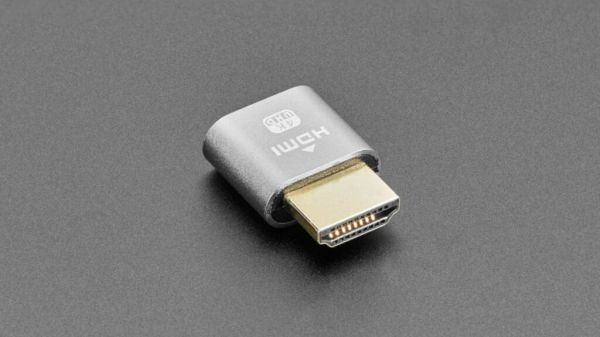
Among the wide range of computer accessories and peripherals out there, there is one that many of you will likely have never seen or had much use for: The HDMI dummy plug. Unlike, say, a fancy hall effect keyboard or a USB microphone like the Razer Serien V3, an HDMI dummy plug isn’t necessarily a mainstream accessory. But, in some situations, a dummy plug can be just as important as either of those.
An HDMI dummy plug is essentially a single-ended HDMI connector with some circuitry, and it comes into play when you need a computer to behave as if it were connected to a display without actually plugging it into a monitor. In those situations, you can connect an HDMI dummy plug to the main HDMI output, and it’ll essentially trick the computer into thinking that there’s a display attached (usually a 4K one, at least with modern plugs).
That probably sounds like it isn’t of much use if you want to sit down in front of the computer and use it, and you’d be right. HDMI dummy plugs are for those situations where you want a computer’s GPU to run normally, at full performance, and with all supported resolutions, but don’t need to see its output directly on a monitor — known as headless computing. This could be for an always-on home server, for example, or for an at-home game streaming server running an app like Moonlight (for example).
Why you may need a dummy plug
Some Macs, such as Mac Minis, for example, may not offer the full range of resolutions if you run them headless. This can be annoying when you remote into the computer from a client and encounter a mismatch between the headless computer’s display output and the client’s monitor resolution. An HDMI dummy plug — or, admittedly, software such as BetterDisplay – will resolve this by letting you go into the display settings and change resolutions to fit. This can happen on Windows, too, of course. Furthermore, some single-board computers might not even boot without an HDMI monitor plugged in, so an HDMI plug would be essential there.
Dummy plugs can also come in handy if you need to simulate a second monitor or one with a different resolution and then capture the video going to said virtual screen using recording software such as OBS. Both are particularly niche use cases, admittedly, but short of physically connecting another monitor, the HDMI dummy plug is probably the most straightforward solution in these situations. HDMI dummy plugs also had a moment in the sun during the heyday of GPU crypto mining, when crypto miners would bypass the mining protection on a lot of GPUs on the market at the time using one of these dummy plugs.