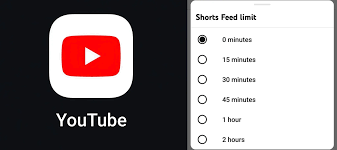
One feature implemented by YouTube which might be beneficial for the users interested in limiting their distraction through the app is the ability to set a Shorts limit to zero minutes. This will not delete the entire Shorts content from the app itself; however, it will disable the feed with the Shorts content and limit the frequency of seeing them in the application.
The changes implemented and what they mean.
Previously, the app had a mandatory minimum limit of viewing Shorts – 15 minutes. Thus, one could only limit their use of this content, but not eliminate it completely.
However, now it is possible to set up a Shorts limit for 0 minutes. By doing this, one will make it impossible to use the Shorts tab throughout the day. If the Shorts limit is reached, the application will provide a notification about that.
The New Focus of YouTube is to Reclaim the Home Feed from Shorts
All in all, this new update is implemented as part of other time management options available within the YouTube app itself.
The biggest change shows up on your Home screen.
When the zero-minute limit is active:
- The Shorts shelf disappears from the main Home feed
- The app shows more long videos and regular recommendations
- The Shorts tab stops working for that day
This makes the app feel closer to how YouTube worked before Shorts became a major focus. If you mainly watch long-form content, the experience becomes cleaner and more predictable.
Where Shorts still show up
This feature does not erase Shorts from the platform. You will still run into them in a few places.
- Subscriptions tab: If a channel you follow posts a Short, it can appear there
- Search results: If you search for a topic, Shorts may show up in results
- Direct links: If someone shares a Short with you, it will still open
- Notifications: If you tap a Shorts notification, it will play
So the limit blocks passive scrolling, not intentional viewing. That is an important distinction. You still have access, but you need to choose it.
How to turn it on
The setup takes less than a minute. The steps are almost the same on Android and iOS.
- Open the YouTube app
- Tap your profile picture
- Go to Settings
- Open Time management or digital well-being
- Turn on the Shorts feed limit
- Set it to 0 minutes
Once this is done, the change takes effect right away.
If you do not see the option yet, your app may not have the update. YouTube is rolling this out in stages, so some devices still show the old 15-minute minimum.
How a New Setting Helps You Manage YouTube Shorts?
Shorts are designed for fast, endless scrolling. That design keeps people in the app longer. For many users, that leads to wasted time without much value.
This new setting gives you a way to break that loop without quitting YouTube altogether.
It also reflects a broader shift. Platforms now face pressure to offer better control over screen time. Features like this help them show they take digital well-being seriously, even if the core product still pushes engagement.
It is useful, but not perfect.
- It does not block Shorts everywhere
- It does not stop you from opening them manually
- It resets daily, so you can still override it the next day
If your goal is to avoid Shorts completely, this setting will not get you all the way there. You would still need extra steps, like avoiding certain channels or using external tools.
If Shorts pull your attention too often, this setting is worth using. It removes the biggest trigger, which is the endless scroll on the Home feed.
At the same time, it keeps the rest of YouTube intact. You can still watch long videos, follow creators, and use search without interruption.
That balance is the point. You stay in control without losing access.
Contact to : xlf550402@gmail.com
Copyright © boyuanhulian 2020 - 2023. All Right Reserved.